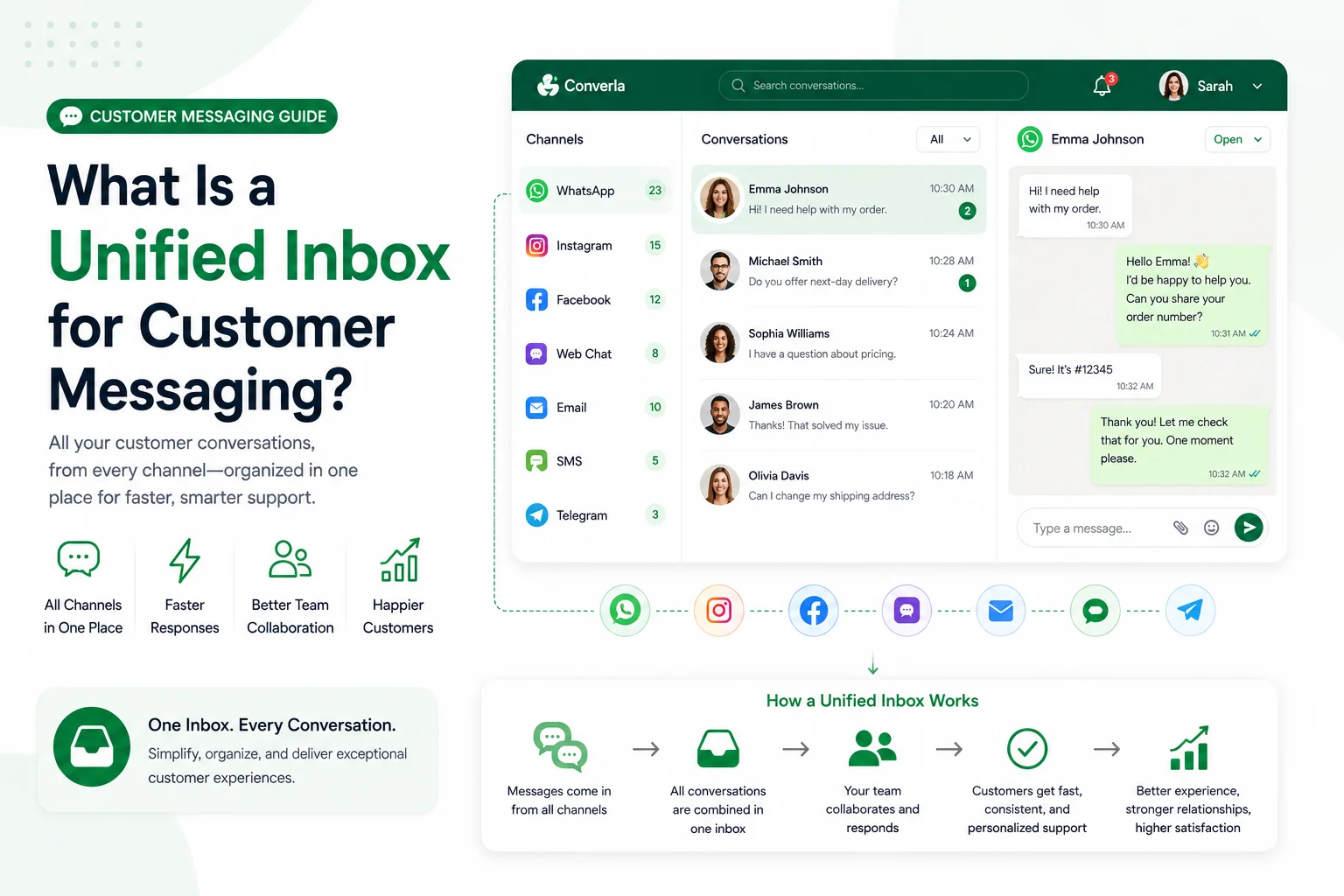
A unified messaging workspace puts WhatsApp, social DMs, email, and web chat on one agent timeline so ownership and history stay intact across shifts. That is the practical answer to “where did this customer leave off?”—not another login per channel. Use it when agents already lose context between apps; skip it only if you truly run a single channel with one owner.
What a unified inbox does for support teams
A unified inbox for customer messaging puts WhatsApp, social DMs, email, and web chat on one agent timeline. It also keeps ownership and notes visible across shifts, and lets supervisors staff lanes they can measure.
It is not a broadcast blaster. It is not a CRM field dump. It is not 24/7 instant human coverage on every channel.
Operators who treat this as treating the inbox as another login to check instead of assignment visibility create more reopen loops than silence would. Keep assignment visibility as the first measurable win and refuse running each channel in its own app.
Why split channel apps fail when volume rises
Volume exposes weak ownership faster than any dashboard review. When unified inbox for customer messaging is unclear, night shift loses day promises and customers repeat order IDs.
Write what the customer will see and who owns the thread in the same published rule—including weekends—before you add another channel or automation branch.
- One contact timeline beats parallel histories.
- Shared notes so shifts inherit context.
- Explicit handoff so customers are not looped.
- Official WhatsApp connectivity stays visible beside other channels.
Channels that belong on one agent timeline
Include channels your customers already use. Keep WhatsApp, Messenger, Instagram, email, website widget beside the thread only when agents actually use those fields under pressure.
Do not add a quiet channel with no owner. A missing owner is worse than a missing integration.
Lock ownership before you add more channels
Route by situation: solo owners keep a thin rule on one phone; shared numbers need lanes teammates can measure. Angle for this guide: unified inbox for customer messaging.
- Map channels customers already use into one workspace
- Name an owner per channel including weekends
- Tag Arabic and English threads explicitly
- Rehearse credentials and handoffs in staging
- Soft-launch a supervised cohort before expanding seats
- Sample reopen reasons weekly and retire looping lines
Migrate from silos without a big-bang cutover
Every operating change must pass these checks before production traffic.
Prefer a thinner honest path over a long menu that still ends in ask-the-agent for every edge case.
- Every thread has a current owner
- Private notes stay out of customer replies
- Bilingual commercial facts match
- Honest status when sync fails
Tip: Trust grows when you state what you will not promise overnight—refunds, shipping dates, or payment approvals nobody can verify offline.
Ready cards you can paste into the playbook
Keep each card under fifty words. Replace bracketed fields with your real names, hours, and timezone.
- Ownership card: “Channel: [Name]. Owner: [Person]. Hours: [Window] [Timezone]. Escalation: [Name].”
- Shift handoff: “Open threads: [Count]. Urgent: [IDs]. Promises made: [Note]. Next owner: [Name].”
Measure inbox health without vanity volume
Track first response time, reopen reasons, and handoff completeness—not raw send volume.
When quality drops, pause expansion; fix the published rule before adding seats or branches.
When phone-only operations stop scaling
A single owner with one WhatsApp number and clear hours can run assignment visibility—from the phone for a long time. That is enough when one person owns one channel within published hours.
Breaking points: more than one person replies on the same number and overwrites context; chats spill into Instagram, Messenger, or web chat without a shared timeline; morning staff cannot see what overnight automation collected beside the thread.
At those points, a platform such as Converla helps: official WhatsApp Business connectivity, a shared team inbox with notes beside each conversation, and visual flows that greet, branch by intent, and hand off to a human without dead ends. Optional AI and knowledge base features depend on plan—compare only what your team can operate on the features page. Continue with the Converla WhatsApp launch checklist. More guides live on the Converla blog.
Keep assignment visibility measurable first. Refuse running each channel in its own app even when a demo looks faster.
Reader checklist before you publish changes
If any line is blank, pause. Keep assignment visibility measurable and keep running each channel in its own app out of production copy.
- Named owner per channel
- Staging rehearsal done
- Bilingual facts checked
- First win defined around assignment visibility
- Supervised cohort reviewed
- Rollback owner named